 Get PSTR free
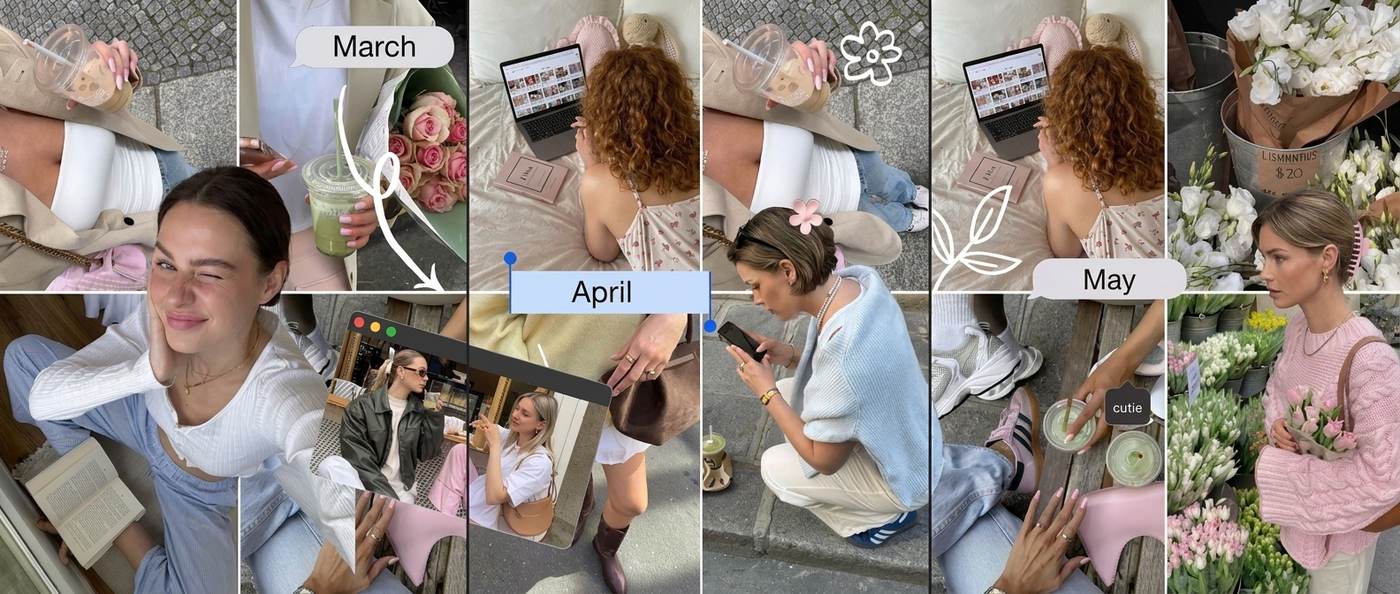
A year recap is the one photo dump people actually wait for, and the one most people give up on halfway through scrolling twelve months of camera roll. The fix is a fixed template: one slide per month, a cover and a closer. Decide the structure first and the picking takes an evening instead of a week.
What to put in it
1. One slide per month. Twelve slides, January to December, each with a small month label. It is the format people recognise instantly, and it fits easily in one carousel.
2. A cover that is not a highlight. Open with something ordinary from your year, like your desk, your street or your hands around a coffee. The highlights land harder after it.
3. Collage the busy months. A month with a trip and a birthday will not fit in one photo. Put three or four on one slide as a collage and keep the slide count at twelve.
4. The same spot, four seasons. Your window, a park bench, the view from work. One frame per season makes a slide nobody else can copy.
5. People of the year. A slide of faces only. Recaps that are all places and food feel lonely, even when the year was not.
6. Firsts. First concert, first apartment, first time somewhere. One small photo each with a word underneath works better than a long caption.
7. The unposted one. One photo you never shared. Recaps get saved for the slides people have not seen yet.
8. A quiet closer. End on December 31st or on something calm, like a window or a road. A last slide gives the year an ending instead of a stop.
Building it without losing a week
Pick by month, not by scrolling. iPhone Photos and Google Photos both group your library by date, so go month by month and take one favourite from each before you look at anything else. Twelve decisions are faster than one huge one.
Instagram allows up to 20 photos or videos in a carousel, so a cover, twelve months and a closer fits with room to spare. Keep every slide the same shape, usually 4:5 portrait, so nothing gets cropped.
Post between the 28th and January 1st. Searches for photo dumps peak on New Year's Eve, and the days right after Christmas are quieter for feeds than the 31st itself.
Slide counts, crop and the rest of the mechanics are on the main photo dump guide.
Year Recap captions
- 2026, in twelve slides
- the year, roughly in order
- twelve months, one post
- 2026 recap, unedited
- that was a year
- january to december, the highlights
- a year in my camera roll
- 2026: kept the good ones
- the year in photos i actually took
- every month, one slide
- proof this year happened
- a soft recap of a loud year
- 2026, thank you and goodbye
- best bits of the year
- twelve chapters
- the year, condensed
- my 2026 highlight reel
- one year, zero regrets about the photos
- see you in 2027
- the whole year, slightly blurry
More, grouped by mood: 100+ photo dump captions.
FAQ
How many slides should a year recap carousel have?
Fourteen is a good default: a cover, one slide per month and a closer. Instagram allows up to 20 photos or videos per carousel, so you can add a few extras, but twelve months is the structure people expect.
What is the best format for a 2026 recap on Instagram?
A photo carousel with one slide per month, all in the same 4:5 portrait shape. Busy months become small collages on one slide. Video recaps work too, but a carousel is easier to make and people can swipe back to their favourite month.
When should I post my year recap?
Between December 28th and January 1st. Interest in photo dumps peaks on New Year's Eve, and the few days before it give you the same audience with less competition.
Is there a template for a month-by-month recap?
Yes. PSTR has month-label templates that lay out each month's photos as a collage slide, so a twelve-month recap is mostly picking photos. In Canva, use a 1080×1350 page per month with the same layout repeated.
More photo dump guides
- Photo dump: what it is and how to make one
- 30 photo dump ideas
- Which photo dump app you need
- 100+ photo dump captions
- Aesthetic photo dump guide
By month
- August photo dump ideas
- September photo dump ideas
- October photo dump ideas
- November photo dump ideas
- December photo dump ideas
- January photo dump ideas
By occasion
Then post it
Open your photos by month tonight, take one from each, and the recap is half done.
If assembling the slides is what keeps the post in drafts, PSTR assembles the slides from your camera roll and exports them at Instagram sizes. Free on both stores, with the AI layout on iPhone for now and the manual editor on Android.